> ## Documentation Index
> Fetch the complete documentation index at: https://docs.2501.ai/llms.txt
> Use this file to discover all available pages before exploring further.
# Models
> Catalog the LLMs your agents can pick as engines
A **Model** is a specific LLM your agents can pick - main engine, secondary engine, or as the tenant's text / multimodal default. Each model belongs to a [Provider](/0.16/configure/providers). Models are managed in **Command Center → Settings → Models**.
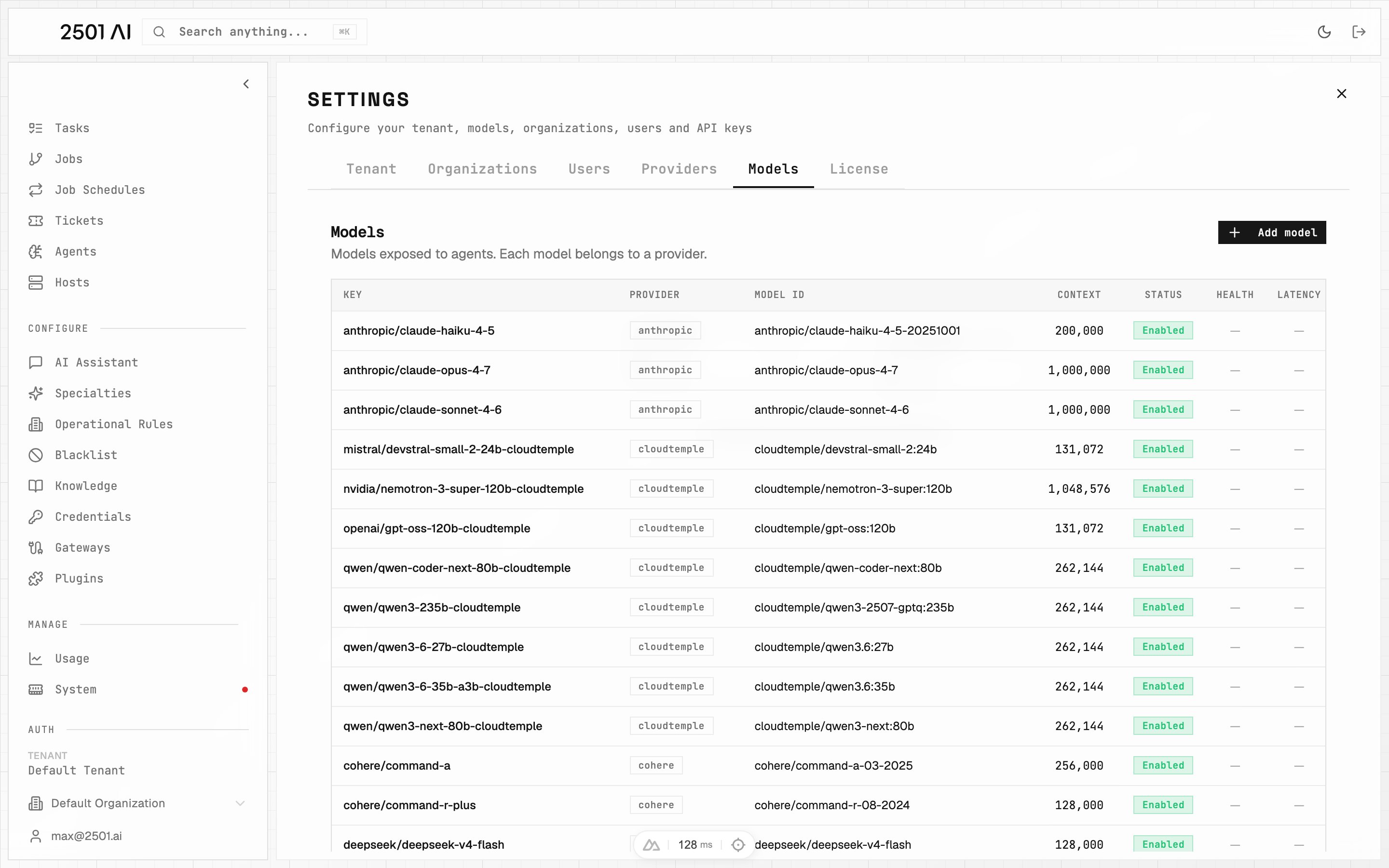 ## Fields
| Field | Required | Description |
| - | - | - |
| **Provider** | Yes | The provider that serves this model |
| **Model ID** | Yes | Must match the model's **deployment name** on the provider exactly - this is the identifier sent to the provider's API, not a label you choose |
| **Key** | No | Display name shown in Command Center and referenced by agents when selecting an engine. Auto-derived from the Model ID if blank. Edit this field to rename |
| **Context length** | Yes | Maximum tokens the model accepts. Drives context-management guidance in [Engine & Agents](/0.16/understand/engine-agents) |
| **Accepts image input** | No | Enable for vision-capable models. Image-capable models become selectable as the tenant's **Multimodal model** |
| **Enabled** | No | Only enabled models appear as selectable engines. Disable to retire without losing configuration or history |
Advanced sampling parameters (temperature, top P, top K, presence/frequency penalty, max output tokens, seed, stop sequences) can be set per model. You can also record pricing plans per model and run an on-demand performance test that reports reachability, time to first token, and throughput.
## Thinking effort
A **thinking-effort** level trades depth of reasoning against latency and cost:
| Level | Description |
| - | - |
| **Off** | No reasoning tokens - fastest, lowest cost |
| **Minimal** | Very light reasoning |
| **Low** | Basic reasoning pass |
| **Medium** | Balanced reasoning depth |
| **High** | Deep reasoning for complex tasks |
| **xHigh** | Maximum reasoning; highest cost |
Some custom or compatible providers do not accept a reasoning argument and reject any request that includes one. If your provider does not support reasoning, leave thinking effort unset - do not select any level.
## Tenant defaults
The tenant's default **Text LLM model** and **Multimodal model** are chosen in **Settings → Tenant** from the catalog's enabled models. Only image-capable models appear as Multimodal options. These defaults power gateway routing, the AI Assistant, knowledge ingestion, and any agent that doesn't pick its own engines.
See [Engine & Agents](/0.16/understand/engine-agents) for how agents combine main and secondary models, and where the tenant defaults are used.
## Deletion rule
A model assigned to any agent - main or secondary - cannot be deleted. Reassign those agents or disable the model instead.
## Deploy-time seeding
On deploy, the installer seeds models from the providers detected in the engine environment. After that, management moves to Command Center - no engine restart needed.
This documentation is built and hosted on [Mintlify](https://mintlify.com), a developer documentation platform.
## Fields
| Field | Required | Description |
| - | - | - |
| **Provider** | Yes | The provider that serves this model |
| **Model ID** | Yes | Must match the model's **deployment name** on the provider exactly - this is the identifier sent to the provider's API, not a label you choose |
| **Key** | No | Display name shown in Command Center and referenced by agents when selecting an engine. Auto-derived from the Model ID if blank. Edit this field to rename |
| **Context length** | Yes | Maximum tokens the model accepts. Drives context-management guidance in [Engine & Agents](/0.16/understand/engine-agents) |
| **Accepts image input** | No | Enable for vision-capable models. Image-capable models become selectable as the tenant's **Multimodal model** |
| **Enabled** | No | Only enabled models appear as selectable engines. Disable to retire without losing configuration or history |
Advanced sampling parameters (temperature, top P, top K, presence/frequency penalty, max output tokens, seed, stop sequences) can be set per model. You can also record pricing plans per model and run an on-demand performance test that reports reachability, time to first token, and throughput.
## Thinking effort
A **thinking-effort** level trades depth of reasoning against latency and cost:
| Level | Description |
| - | - |
| **Off** | No reasoning tokens - fastest, lowest cost |
| **Minimal** | Very light reasoning |
| **Low** | Basic reasoning pass |
| **Medium** | Balanced reasoning depth |
| **High** | Deep reasoning for complex tasks |
| **xHigh** | Maximum reasoning; highest cost |
Some custom or compatible providers do not accept a reasoning argument and reject any request that includes one. If your provider does not support reasoning, leave thinking effort unset - do not select any level.
## Tenant defaults
The tenant's default **Text LLM model** and **Multimodal model** are chosen in **Settings → Tenant** from the catalog's enabled models. Only image-capable models appear as Multimodal options. These defaults power gateway routing, the AI Assistant, knowledge ingestion, and any agent that doesn't pick its own engines.
See [Engine & Agents](/0.16/understand/engine-agents) for how agents combine main and secondary models, and where the tenant defaults are used.
## Deletion rule
A model assigned to any agent - main or secondary - cannot be deleted. Reassign those agents or disable the model instead.
## Deploy-time seeding
On deploy, the installer seeds models from the providers detected in the engine environment. After that, management moves to Command Center - no engine restart needed.
This documentation is built and hosted on [Mintlify](https://mintlify.com), a developer documentation platform.