> ## Documentation Index
> Fetch the complete documentation index at: https://docs.2501.ai/llms.txt
> Use this file to discover all available pages before exploring further.
# Providers
> Register the LLM endpoints the engine can call
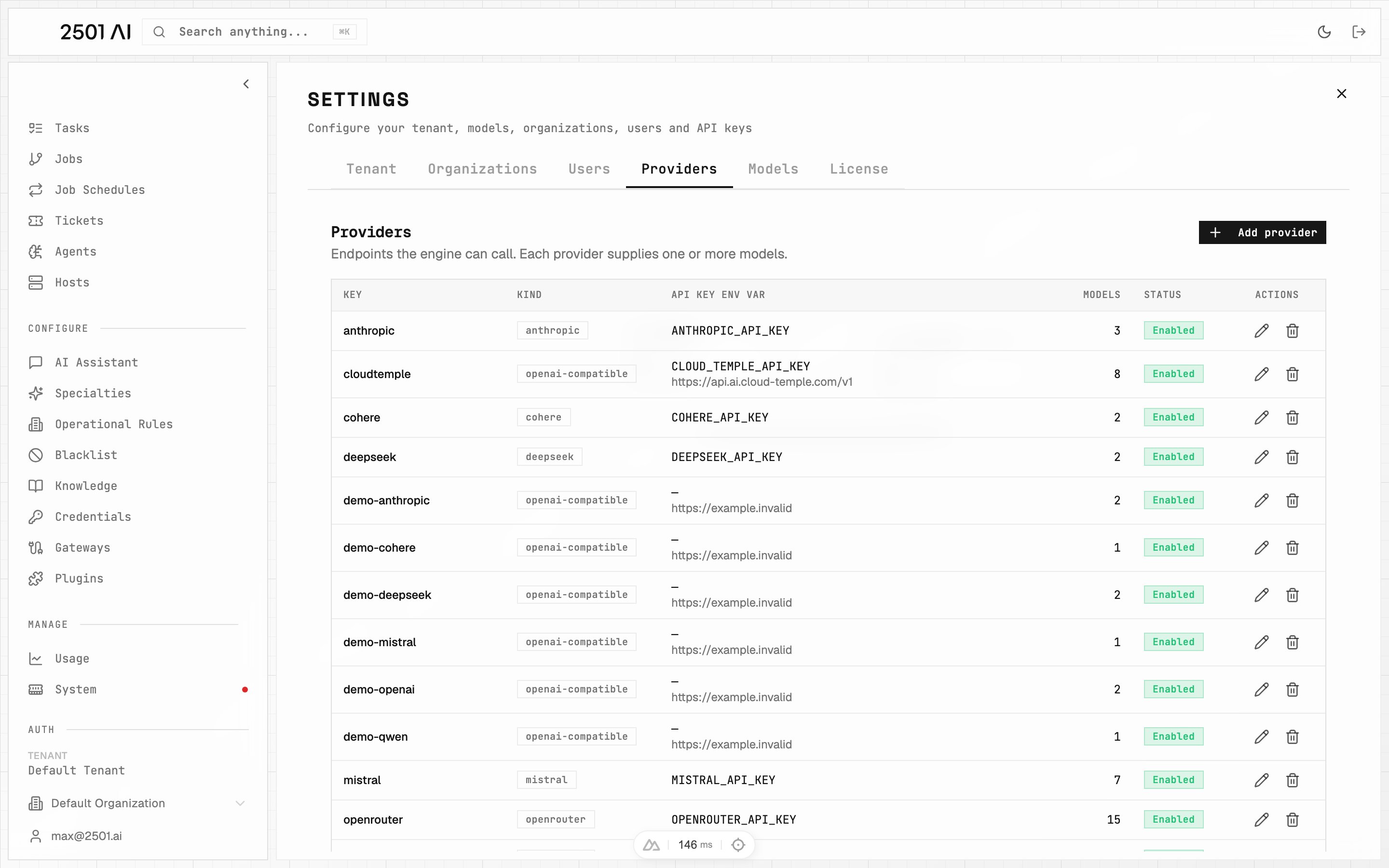
A **Provider** is an LLM endpoint the engine talks to. One provider can expose many [Models](/0.17/configure/models). Providers are managed in **Command Center → Settings → Providers**, scoped to your tenant.
Any user can view providers available to their organization. **Tenant-level admins** can add, edit, or delete providers in either scope. **Organization admins** can manage providers in their assigned organizations, but tenant-wide providers are read-only for them. See [Users & Organizations](/0.17/deployment/users-organizations).
 ## Fields
| Field | Required | Description |
| - | - | - |
| **Key** | Yes | Short identifier, unique within your tenant. Example: `openai`, `cloudtemple` |
| **Provider type** | Yes | Integration used to reach the provider - see [Provider types](#provider-types) |
| **Base URL** | Compatible & Azure types | Endpoint root. Required for compatible/Azure types; leave empty for native types |
| **API key** | When auth is required | The [Credential](/0.17/configure/credentials) holding the secret. Select one available in the provider's scope - see [API key resolution](#api-key-resolution) |
| **Auth Header Name** | Compatible types (optional) | Override the HTTP header used to send the API key. Defaults to each type's native header - `Authorization` (Bearer) for `openai-compatible`, `x-api-key` for `anthropic-compatible`. Set to e.g. `api-key` for Azure API Management or other proxy gateways that require a non-standard header. |
| **Scope** | No | **Scoped to Organization**, the default, limits the provider to the currently selected organization, so only that org's agents use it and its credentials. **Scoped to Tenant** makes it available to every organization. Chosen at creation only, and the provider's models inherit it. Needs tenant-level access. |
| **Requires auth** | - | On by default. Turn off for endpoints with no key (e.g. self-hosted on a private network) |
| **Enabled** | - | Disabling makes all of its models unavailable without deleting anything |
## Provider types
| Family | Types | Notes |
| - | - | - |
| **Native** | `openai`, `anthropic`, `mistral`, `deepseek`, `cohere`, `openrouter`, `togetherai` | Built-in integrations. No endpoint URL needed. |
| **Compatible** | `openai-compatible`, `anthropic-compatible`, `azure` | Point at any API-compatible endpoint via a **Base URL** |
Use a **compatible** type to register a self-hosted model server (vLLM, Ollama, LM Studio) or any vendor exposing an OpenAI- or Anthropic-style API.
Adding a new endpoint of an existing type is pure configuration. Adding a brand-new *type* (a vendor with its own API shape) requires a 2501 release - contact your Account Executive.
## API key resolution
A provider reads its API key from the [Credential](/0.17/configure/credentials) attached to it.
Clicking **API key** opens a searchable list of credentials available in the provider's scope. Choosing **Scoped to Tenant** narrows the list to tenant-scoped credentials. Select a result, or type a listed credential's full name and press **Enter**; surrounding spaces are ignored. If credential search fails, use **Retry** - your saved selection stays unchanged.
Rotating a key is editing that credential. Nothing on the engine changes, and the dialog checks the credential resolves before it saves.
For a **tenant-wide** provider, the credential must be **tenant-scoped** - one restricted to a specific organization is not reachable. For an **org-scoped** provider, the credential may be scoped to that organization or tenant-wide.
Providers created before credentials were attachable resolve their key by name instead: a credential of that name first, then - for the built-in provider keys only (`ANTHROPIC_API_KEY`, `OPENAI_API_KEY`, `OPENROUTER_API_KEY`, `MISTRAL_API_KEY`, `DEEPSEEK_API_KEY`, `COHERE_API_KEY`, `TOGETHER_API_KEY`, `CLOUD_TEMPLE_API_KEY`, `BASETEN_API_KEY`) - an environment variable of that name on the engine. Any other name resolves through a credential or not at all. Re-pick the key in the dialog to attach it directly - the name reference and the environment variable fallback are going away.
Providers that do not need a key (e.g. a self-hosted model on a private network) can turn off **Requires auth**.
## Azure settings
For the `azure` type, two extra fields appear:
| Field | Default | Description |
| - | - | - |
| **API Version** | `2025-04-01-preview` | The Azure OpenAI API version to target |
| **API Mode** | `chat` | Which API surface to call: `chat`, `responses`, or `completion` |
Azure API Management (APIM) gateways are supported as the endpoint: set the **Base URL** to your APIM gateway URL to route model traffic through it for centralized policy, rate limiting, and logging.
## Deletion rule
A provider that still has models cannot be deleted. Remove or reassign its models first, or simply disable the provider instead.
## Deploy-time seeding
On deploy, the installer seeds providers from API keys detected in the engine environment. After that, management moves to Command Center - no engine restart needed for additions or edits.
This documentation is built and hosted on [Mintlify](https://mintlify.com), a developer documentation platform.
## Fields
| Field | Required | Description |
| - | - | - |
| **Key** | Yes | Short identifier, unique within your tenant. Example: `openai`, `cloudtemple` |
| **Provider type** | Yes | Integration used to reach the provider - see [Provider types](#provider-types) |
| **Base URL** | Compatible & Azure types | Endpoint root. Required for compatible/Azure types; leave empty for native types |
| **API key** | When auth is required | The [Credential](/0.17/configure/credentials) holding the secret. Select one available in the provider's scope - see [API key resolution](#api-key-resolution) |
| **Auth Header Name** | Compatible types (optional) | Override the HTTP header used to send the API key. Defaults to each type's native header - `Authorization` (Bearer) for `openai-compatible`, `x-api-key` for `anthropic-compatible`. Set to e.g. `api-key` for Azure API Management or other proxy gateways that require a non-standard header. |
| **Scope** | No | **Scoped to Organization**, the default, limits the provider to the currently selected organization, so only that org's agents use it and its credentials. **Scoped to Tenant** makes it available to every organization. Chosen at creation only, and the provider's models inherit it. Needs tenant-level access. |
| **Requires auth** | - | On by default. Turn off for endpoints with no key (e.g. self-hosted on a private network) |
| **Enabled** | - | Disabling makes all of its models unavailable without deleting anything |
## Provider types
| Family | Types | Notes |
| - | - | - |
| **Native** | `openai`, `anthropic`, `mistral`, `deepseek`, `cohere`, `openrouter`, `togetherai` | Built-in integrations. No endpoint URL needed. |
| **Compatible** | `openai-compatible`, `anthropic-compatible`, `azure` | Point at any API-compatible endpoint via a **Base URL** |
Use a **compatible** type to register a self-hosted model server (vLLM, Ollama, LM Studio) or any vendor exposing an OpenAI- or Anthropic-style API.
Adding a new endpoint of an existing type is pure configuration. Adding a brand-new *type* (a vendor with its own API shape) requires a 2501 release - contact your Account Executive.
## API key resolution
A provider reads its API key from the [Credential](/0.17/configure/credentials) attached to it.
Clicking **API key** opens a searchable list of credentials available in the provider's scope. Choosing **Scoped to Tenant** narrows the list to tenant-scoped credentials. Select a result, or type a listed credential's full name and press **Enter**; surrounding spaces are ignored. If credential search fails, use **Retry** - your saved selection stays unchanged.
Rotating a key is editing that credential. Nothing on the engine changes, and the dialog checks the credential resolves before it saves.
For a **tenant-wide** provider, the credential must be **tenant-scoped** - one restricted to a specific organization is not reachable. For an **org-scoped** provider, the credential may be scoped to that organization or tenant-wide.
Providers created before credentials were attachable resolve their key by name instead: a credential of that name first, then - for the built-in provider keys only (`ANTHROPIC_API_KEY`, `OPENAI_API_KEY`, `OPENROUTER_API_KEY`, `MISTRAL_API_KEY`, `DEEPSEEK_API_KEY`, `COHERE_API_KEY`, `TOGETHER_API_KEY`, `CLOUD_TEMPLE_API_KEY`, `BASETEN_API_KEY`) - an environment variable of that name on the engine. Any other name resolves through a credential or not at all. Re-pick the key in the dialog to attach it directly - the name reference and the environment variable fallback are going away.
Providers that do not need a key (e.g. a self-hosted model on a private network) can turn off **Requires auth**.
## Azure settings
For the `azure` type, two extra fields appear:
| Field | Default | Description |
| - | - | - |
| **API Version** | `2025-04-01-preview` | The Azure OpenAI API version to target |
| **API Mode** | `chat` | Which API surface to call: `chat`, `responses`, or `completion` |
Azure API Management (APIM) gateways are supported as the endpoint: set the **Base URL** to your APIM gateway URL to route model traffic through it for centralized policy, rate limiting, and logging.
## Deletion rule
A provider that still has models cannot be deleted. Remove or reassign its models first, or simply disable the provider instead.
## Deploy-time seeding
On deploy, the installer seeds providers from API keys detected in the engine environment. After that, management moves to Command Center - no engine restart needed for additions or edits.
This documentation is built and hosted on [Mintlify](https://mintlify.com), a developer documentation platform.