> ## Documentation Index
> Fetch the complete documentation index at: https://docs.2501.ai/llms.txt
> Use this file to discover all available pages before exploring further.
# Agents
> The LLMs autonomously browsing your systems
Agents are the core execution units of 2501: autonomous AI systems that perform operational tasks on your infrastructure. Each agent combines LLM-powered intelligence with programmatic access to your systems, enabling complex workflows, issue diagnosis, and infrastructure management through natural language instructions.
## What is an Agent?
A 2501 agent is an AI-powered operator capable of understanding context by analyzing tasks and interpreting system states, planning execution by breaking down complex operations into logical steps, taking action through commands and file modifications, adapting dynamically based on outputs and errors, and operating autonomously to complete multi-step tasks without constant intervention.
Unlike traditional automation scripts, agents reason about their environment and make informed decisions rather than following rigid procedural logic.
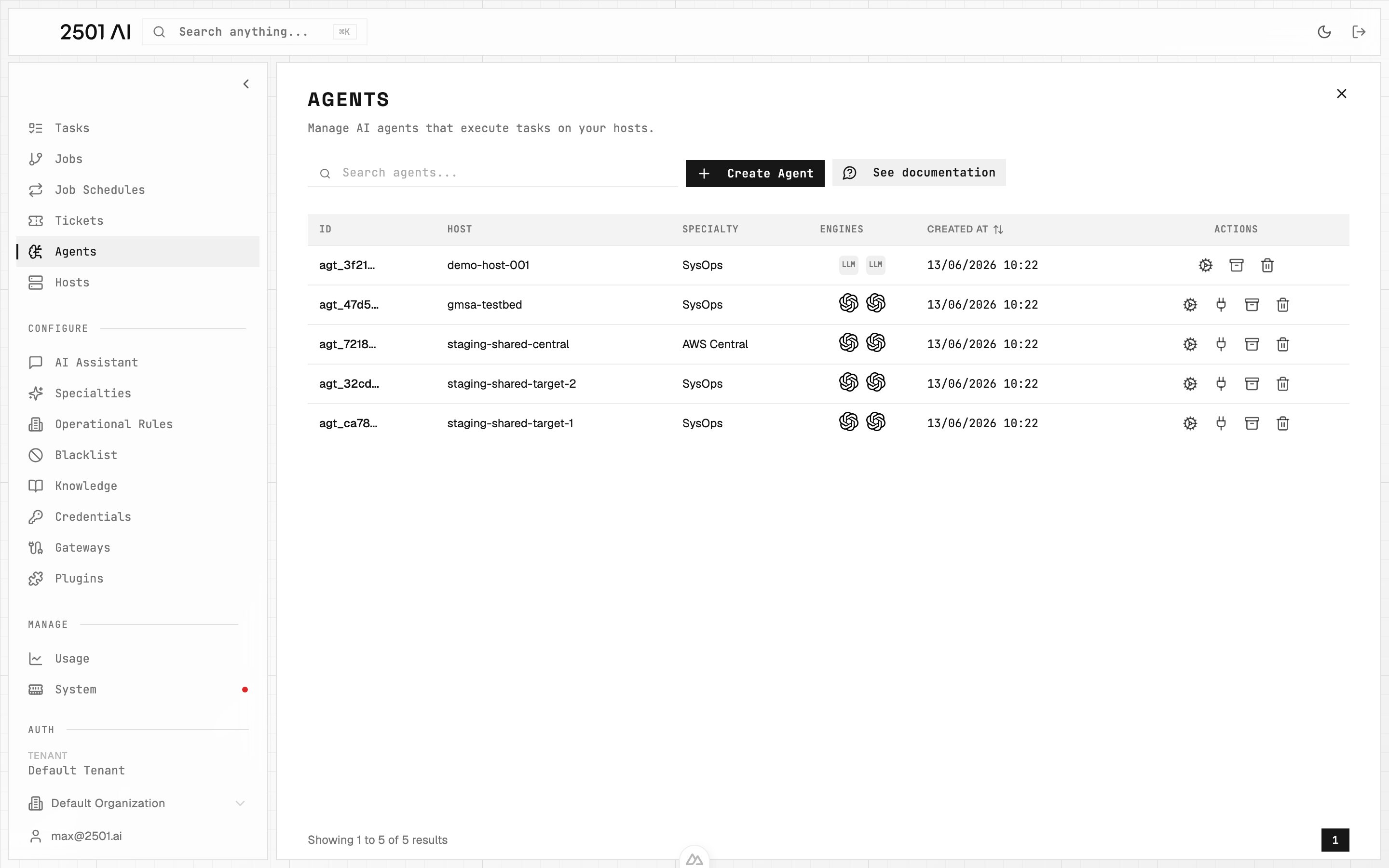 ## Agent Architecture
### Engine Pair
Every agent uses two LLMs in tandem:
* **Main Engine**: Handles direct task execution, file manipulation, and command execution
* **Secondary Engine**: Manages orchestration, planning, validation, and oversight
This dual-engine architecture separates execution from planning, improving accuracy and safety. Learn more in [Engines](/0.7/understand/engine-agents).
### Specialty Configuration
Agents are assigned a [Specialty](/0.7/configure/specialties) that provides domain-specific guidance and workflows, ranging from general-purpose (`SYSOPS`) to highly specialized configurations like `TERRAFORM_SPECIALIST` or `AWS_CLI_EXPERT`.
### Operational Constraints
Agents operate within boundaries defined by [Operational Rules](/0.7/configure/operational-rules) (organization-wide mandatory procedures), [Blacklists](/0.7/configure/blacklist) (prohibited commands), and [Credentials](/0.7/configure/credentials) (secure access to systems).
### Credential Access Control
Each agent has an explicit **credential allowlist** — a list of credentials it may reference by name during task execution. Configure the list from the agent create or edit form. Only credentials on the allowlist are advertised to the agent; secret values are never exposed. Named credential placeholders in commands (e.g. `{{secret:my-api-key}}`) resolve only when the referenced credential appears on the agent's allowlist. An empty allowlist means no named credentials are available to the agent.
### Memory and Context
Agents maintain task history within their context window, allowing them to reference previous operations, build on prior work, and maintain continuity across related tasks. When context limits are approached, tasks can be archived to clear memory while preserving agent configuration.
## Execution Modes: Investigate vs Remediate
Agents support two execution modes that control what actions they can take:
* **Remediate** (default): The agent diagnoses issues **and** applies fixes: commands, file changes, service restarts, etc.
* **Investigate**: Read-only analysis. The agent diagnoses and reports findings without making any changes to the target system.
The mode is determined at two levels:
| Level | How | Scope |
| ------------- | -------------------------------------------------------------------------------- | --------------------------------------------------------------------------------- |
| **Ticket** | Tag with `@2501:investigate` or `@2501:remediate` in the ticket body or comments | Single ticket/job: defaults to remediate if no tag is present |
| **Specialty** | Pin to investigate-only in the [specialty](/0.7/configure/specialties) settings | All agents using that specialty: acts as a ceiling that overrides ticket requests |
The ticket tag sets the job mode, which propagates to individual tasks. If multiple tags appear (in the description and comments), the last one wins. Aliases like `@2501:investigation` and `@2501:remediation` also work.
The specialty constraint is a **ceiling**: if a specialty is pinned to `investigate_only`, any agent using it will always run in read-only mode, even if the ticket is tagged `@2501:remediate`. When this happens, the resolution is flagged as **partial** rather than a failure. This lets you safely deploy large fleets of agents and selectively enable remediation by changing a single setting on the specialty.
Tickets and jobs running in Investigate mode show a visible **Investigate** badge in the Command Center.
## Local vs Remote Execution
**Remote execution** is the default and what virtually every deployment uses. The agent runs in 2501's infrastructure and connects to the target machine via the configured protocol (SSH, WinRM, gMSA over Kerberos). Tasks run without installing the CLI on the target, agent management stays centralized, and the same agent can operate across a fleet.
**Local execution** is also supported — the agent runs directly on the machine where the 2501 CLI is installed, with direct filesystem and process access — but it's reserved for niche developer workflows and is rarely chosen in production.
The execution mode is transparent to the agent itself. It uses the same capabilities regardless of where it runs.
## Agent Architecture
### Engine Pair
Every agent uses two LLMs in tandem:
* **Main Engine**: Handles direct task execution, file manipulation, and command execution
* **Secondary Engine**: Manages orchestration, planning, validation, and oversight
This dual-engine architecture separates execution from planning, improving accuracy and safety. Learn more in [Engines](/0.7/understand/engine-agents).
### Specialty Configuration
Agents are assigned a [Specialty](/0.7/configure/specialties) that provides domain-specific guidance and workflows, ranging from general-purpose (`SYSOPS`) to highly specialized configurations like `TERRAFORM_SPECIALIST` or `AWS_CLI_EXPERT`.
### Operational Constraints
Agents operate within boundaries defined by [Operational Rules](/0.7/configure/operational-rules) (organization-wide mandatory procedures), [Blacklists](/0.7/configure/blacklist) (prohibited commands), and [Credentials](/0.7/configure/credentials) (secure access to systems).
### Credential Access Control
Each agent has an explicit **credential allowlist** — a list of credentials it may reference by name during task execution. Configure the list from the agent create or edit form. Only credentials on the allowlist are advertised to the agent; secret values are never exposed. Named credential placeholders in commands (e.g. `{{secret:my-api-key}}`) resolve only when the referenced credential appears on the agent's allowlist. An empty allowlist means no named credentials are available to the agent.
### Memory and Context
Agents maintain task history within their context window, allowing them to reference previous operations, build on prior work, and maintain continuity across related tasks. When context limits are approached, tasks can be archived to clear memory while preserving agent configuration.
## Execution Modes: Investigate vs Remediate
Agents support two execution modes that control what actions they can take:
* **Remediate** (default): The agent diagnoses issues **and** applies fixes: commands, file changes, service restarts, etc.
* **Investigate**: Read-only analysis. The agent diagnoses and reports findings without making any changes to the target system.
The mode is determined at two levels:
| Level | How | Scope |
| ------------- | -------------------------------------------------------------------------------- | --------------------------------------------------------------------------------- |
| **Ticket** | Tag with `@2501:investigate` or `@2501:remediate` in the ticket body or comments | Single ticket/job: defaults to remediate if no tag is present |
| **Specialty** | Pin to investigate-only in the [specialty](/0.7/configure/specialties) settings | All agents using that specialty: acts as a ceiling that overrides ticket requests |
The ticket tag sets the job mode, which propagates to individual tasks. If multiple tags appear (in the description and comments), the last one wins. Aliases like `@2501:investigation` and `@2501:remediation` also work.
The specialty constraint is a **ceiling**: if a specialty is pinned to `investigate_only`, any agent using it will always run in read-only mode, even if the ticket is tagged `@2501:remediate`. When this happens, the resolution is flagged as **partial** rather than a failure. This lets you safely deploy large fleets of agents and selectively enable remediation by changing a single setting on the specialty.
Tickets and jobs running in Investigate mode show a visible **Investigate** badge in the Command Center.
## Local vs Remote Execution
**Remote execution** is the default and what virtually every deployment uses. The agent runs in 2501's infrastructure and connects to the target machine via the configured protocol (SSH, WinRM, gMSA over Kerberos). Tasks run without installing the CLI on the target, agent management stays centralized, and the same agent can operate across a fleet.
**Local execution** is also supported — the agent runs directly on the machine where the 2501 CLI is installed, with direct filesystem and process access — but it's reserved for niche developer workflows and is rarely chosen in production.
The execution mode is transparent to the agent itself. It uses the same capabilities regardless of where it runs.
 ## Agent Lifecycle
### Creation
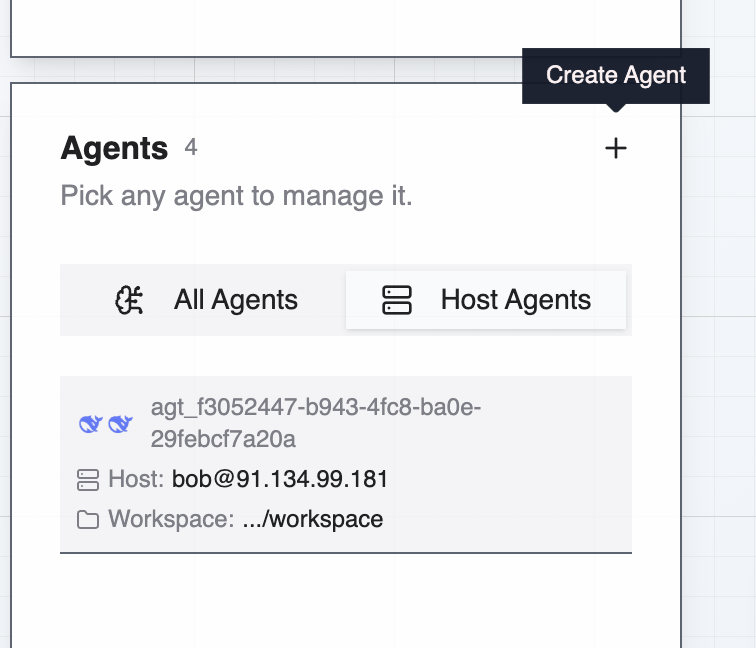
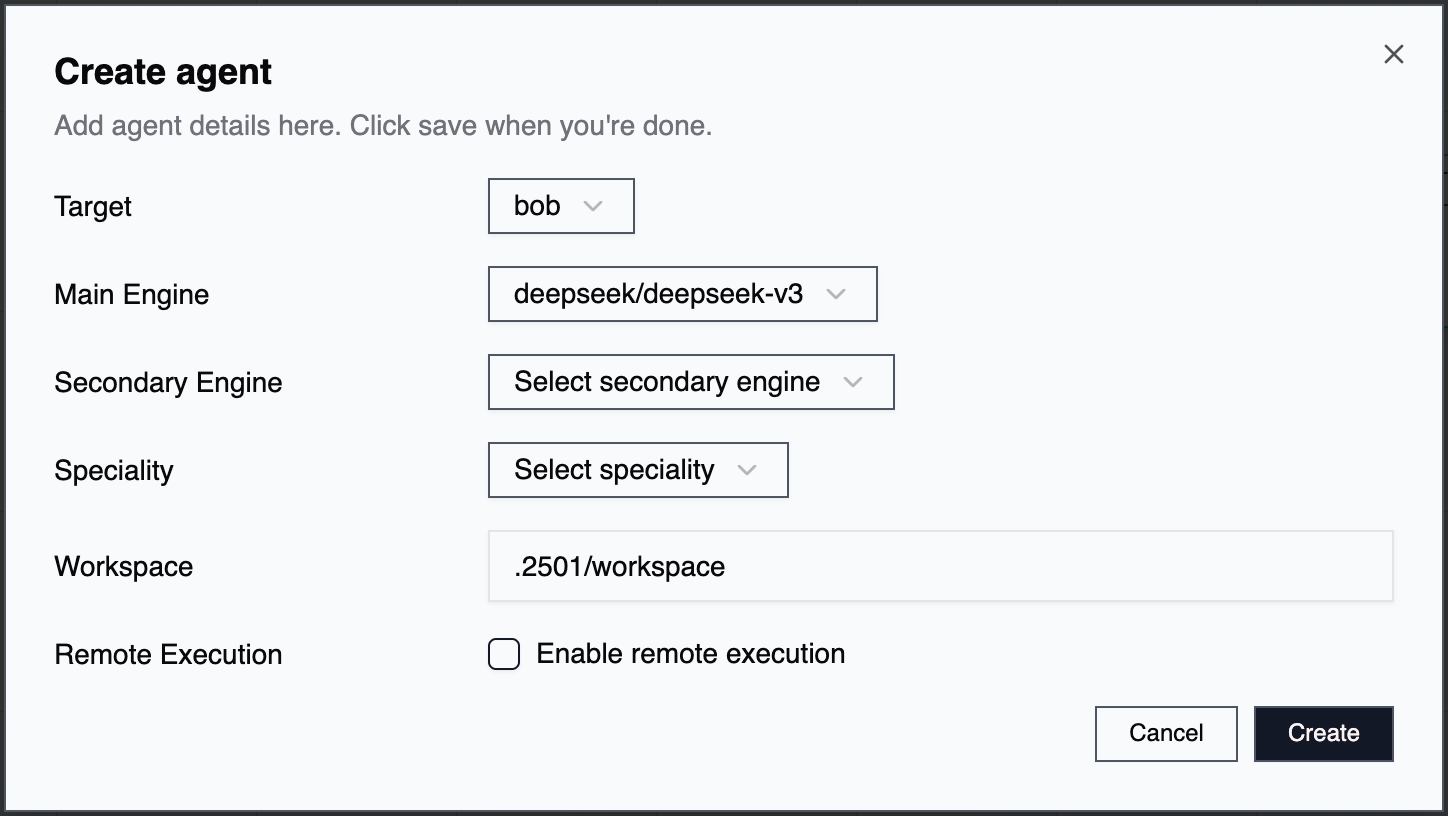
Agents are created through the Command Center UI (full-featured) or CLI (streamlined for quick deployment). During creation, assign a [host](/0.7/core-concepts/hosts), select main and secondary engines, assign a specialty, enable remote execution if needed, assign plugins, and configure credentials (for remote execution).
## Agent Lifecycle
### Creation
Agents are created through the Command Center UI (full-featured) or CLI (streamlined for quick deployment). During creation, assign a [host](/0.7/core-concepts/hosts), select main and secondary engines, assign a specialty, enable remote execution if needed, assign plugins, and configure credentials (for remote execution).
 ### Configuration
After creation, agents can be modified to change engine assignments, update specialty configurations, add or remove credentials, and adjust operational constraints.
### Task Execution
Agents receive tasks through natural language instructions. The secondary engine analyzes the request and gathers context. It creates an execution plan, then the main engine executes actions and validates results. The agent adapts as needed and reports completion or escalates issues.
### Memory Management
As agents work, their context window fills with task history. Manage memory by archiving completed tasks individually, clearing all memory for a fresh start, or selectively archiving unrelated tasks while preserving relevant context.
### Modification and Deletion
Agents can be edited or removed through the Command Center UI (full management) or CLI (limited management for active agents).
### Configuration
After creation, agents can be modified to change engine assignments, update specialty configurations, add or remove credentials, and adjust operational constraints.
### Task Execution
Agents receive tasks through natural language instructions. The secondary engine analyzes the request and gathers context. It creates an execution plan, then the main engine executes actions and validates results. The agent adapts as needed and reports completion or escalates issues.
### Memory Management
As agents work, their context window fills with task history. Manage memory by archiving completed tasks individually, clearing all memory for a fresh start, or selectively archiving unrelated tasks while preserving relevant context.
### Modification and Deletion
Agents can be edited or removed through the Command Center UI (full management) or CLI (limited management for active agents).
 ## Agent Organization
### Organization Scoping
Agents belong to specific [organizations](/0.7/core-concepts/organizations), with available specialties, operational rules, blacklisted commands, and accessible credentials. This scoping enables different teams or environments to maintain separate operational standards while sharing infrastructure.
### Agent Naming
Choose agent names that indicate purpose or responsibility (e.g., `aws-prod-manager`, `db-backup-agent`), target environment (e.g., `staging-deployer`, `prod-monitor`), or specialty domain (e.g., `terraform-provisioner`, `k8s-operator`).
## Testing Connectivity
For agents configured for remote execution, you can verify connectivity to the assigned host directly from the Command Center. On the Agents page, use the **Test connection** action on the agent's row: this checks that the agent can reach its host using the configured protocol (SSH or WinRM) and credentials.
## Troubleshooting
**Agent Not Completing Tasks:** Check context window usage and archive tasks if near limits. Verify credentials are correctly assigned and accessible. Review operational rules for conflicts. Ensure specialty provides adequate guidance. Consider upgrading engines for complex tasks.
**Execution Errors:** Validate remote-access credentials — use the **Test connection** action to quickly verify connectivity. Check the blacklist for inadvertently blocked commands. Review task history for failure patterns. Verify target system accessibility and permissions.
**Unexpected Behavior:** Review the agent's specialty for conflicting guidance. Check for overly strict operational rules. Examine task history to understand decision-making. Test with simplified tasks to isolate the issue. Consider adjusting engine assignments.
For additional support, refer to the Prompting Guide for techniques to improve agent task understanding and execution.
## Agent Organization
### Organization Scoping
Agents belong to specific [organizations](/0.7/core-concepts/organizations), with available specialties, operational rules, blacklisted commands, and accessible credentials. This scoping enables different teams or environments to maintain separate operational standards while sharing infrastructure.
### Agent Naming
Choose agent names that indicate purpose or responsibility (e.g., `aws-prod-manager`, `db-backup-agent`), target environment (e.g., `staging-deployer`, `prod-monitor`), or specialty domain (e.g., `terraform-provisioner`, `k8s-operator`).
## Testing Connectivity
For agents configured for remote execution, you can verify connectivity to the assigned host directly from the Command Center. On the Agents page, use the **Test connection** action on the agent's row: this checks that the agent can reach its host using the configured protocol (SSH or WinRM) and credentials.
## Troubleshooting
**Agent Not Completing Tasks:** Check context window usage and archive tasks if near limits. Verify credentials are correctly assigned and accessible. Review operational rules for conflicts. Ensure specialty provides adequate guidance. Consider upgrading engines for complex tasks.
**Execution Errors:** Validate remote-access credentials — use the **Test connection** action to quickly verify connectivity. Check the blacklist for inadvertently blocked commands. Review task history for failure patterns. Verify target system accessibility and permissions.
**Unexpected Behavior:** Review the agent's specialty for conflicting guidance. Check for overly strict operational rules. Examine task history to understand decision-making. Test with simplified tasks to isolate the issue. Consider adjusting engine assignments.
For additional support, refer to the Prompting Guide for techniques to improve agent task understanding and execution.