

The files
One format per entity, in CSV or JSON. The columns are the same either way, and they are the fields of the API - so a file doubles as documentation of what you can set. A file belongs to one organization. The organization comes from the request, and everything a row points at belongs to it: an id only means something inside that organization, and technology, application and tag names resolve to that organization’s own entries.hosts
agents
In JSON, an agent’s credentials are one
credential_config array instead of the three columns. Use JSON when you need something the columns cannot express: an optional credential, two credentials on one role, a hand-tuned order, or a public key (which has no column, because it is stored but never used to build a connection).
Ids come from an export - a host’s is also in the URL of its page in Command Center. Start a hand-written agent file from a hosts export, so the host ids are already right.
Technologies, applications and tags
technologies, applications and tags hold the host’s entries, and the two formats write them differently:
- CSV cells hold names, comma-separated:
"PostgreSQL,Redis". A name is matched to your organization’s entry whatever its case, and a known technology’s other name works too, sopostgresattaches PostgreSQL. An export writes each entry’s name. - JSON carries each entry as
{ "id": "...", "name": "..." }, the way the API does. Theidwins, so a JSON export imports back unchanged even after an entry is renamed, and anidthat doesn’t exist in the organization fails only its row. An entry you write by hand only needs itsname.
customer-facing leaves the host with that one tag, and an empty cell empties the list.
Old axis:value tags are not translated. In the tags column, tech:postgres is a tag named tech:postgres: put PostgreSQL in technologies instead.
A file attaches entries to hosts and nothing more. An entry’s own details, such as an application’s description, are set in Hosts > Applications or Hosts > Tags.
References
Anywhere a file points at another entity - a credential, a specialty, an agent’s host - write its id. Exports write ids, and an id survives a rename. Technologies, applications and tags are the one family that CSV names instead, as described above. There is one exception, so that a whole fleet fits in one file: in a hosts file,jump_hosts may hold the name of a row above it, which is how you create a bastion and the hosts routed through it in a single import. That name is matched only against earlier rows of the same file, never against your existing hosts.
So file order matters: put a bastion above the hosts routed through it, and the innermost bastion first in a chain. A reference pointing further down the file is an error that tells you which line to move, and the preview reports all of them at once.
A two-hop fleet in one file, ordered innermost bastion first. edge-gw is written before bastion-dmz refers to it, and both before sensor-01 routes through the pair:
sensor-01 fails with “edge-gw is defined on row 3, below this one”.
Everything else a file references - credentials, specialties, an agent’s host - must already exist.
What an import does to existing data
Two rules cover everything. A row with anid updates that entity. A row without one creates it. There is no third case. An id that does not exist, or belongs to another organization, is an error - an id never creates one.
An update states the whole record. A file that updates anything has to carry every column: a value sets a field, an empty cell clears it, and a missing column is rejected with the column named. There is no partial update by file.
What that means in practice:
- Bulk-edit by editing an export. An export already contains every column, so export → change what you want → import does exactly what it looks like: the fleet matches the file.
- A two-column update file is an error, not a shortcut.
id,knowledgewill not import. That is deliberate: the alternative is a file that silently blanks every field it forgot to mention. - To change a single host or agent, use its own API endpoint (
POST /api/v1/hosts/{id}) rather than a file. - A file that only creates may carry any subset of columns, because there is nothing to lose -
name,private_ip,jump_hostsis a perfectly good first-import file. Anything the file leaves out takes its default.
null clears.
Validation runs on the result, not on the row: a create must produce a complete, valid entity, and an update may not clear something mandatory or leave an invalid combination. Nothing can produce a half-valid host or agent - a row that would fails instead.
Re-importing a file whose id cells are empty tries to create everything again. Host names must be unique in an organization, so you get errors rather than duplicates - keep the ids if you want a file you can re-apply.
Importing
In Command Center, open Hosts or Agents and use Import. Pick a.csv or .json file and press Preview first: the preview is the real server verdict for every row - names resolved against your live inventory, licences checked - not a guess made in the browser. Nothing is written until you confirm.
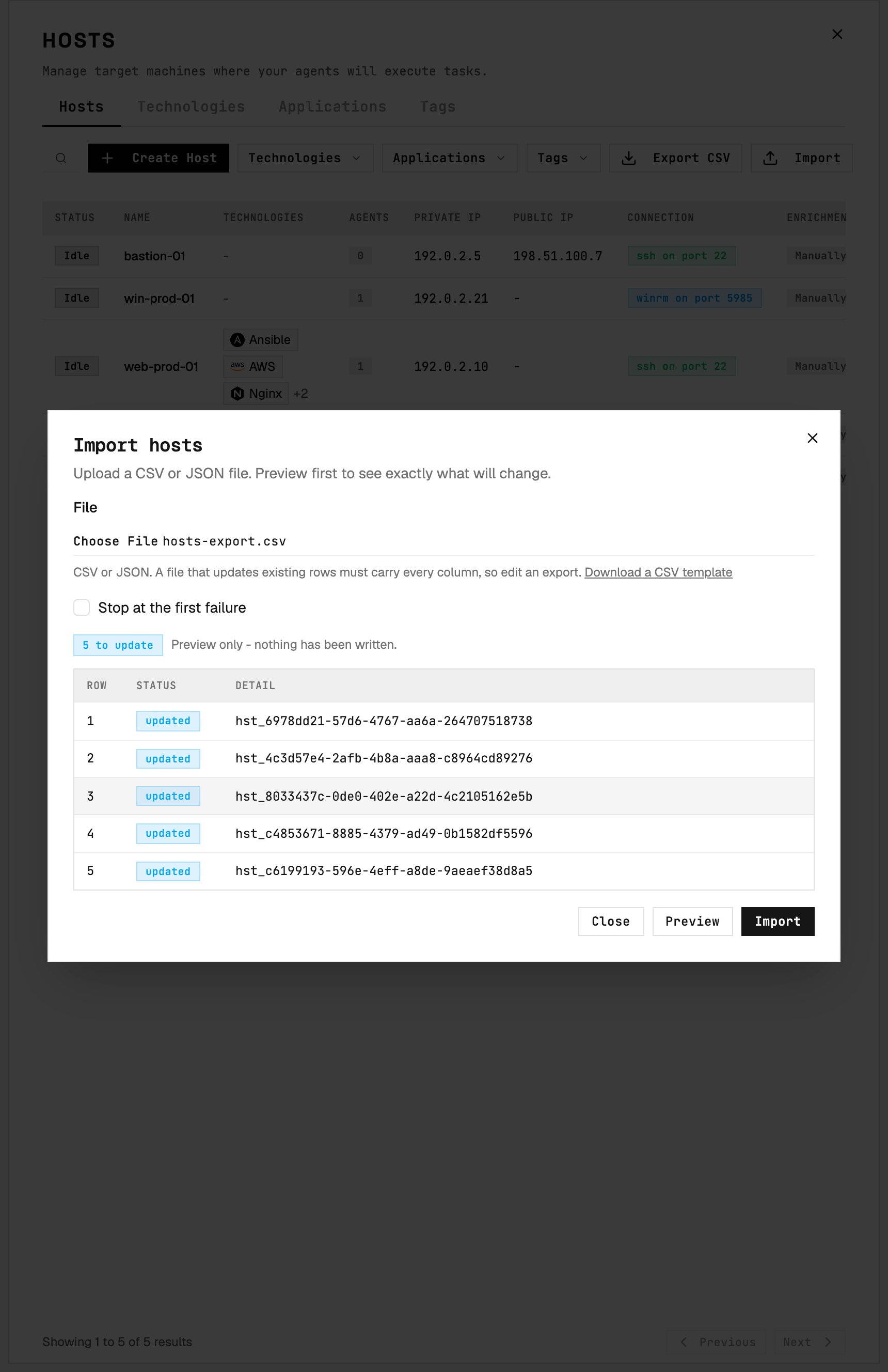
Preview shows the proposed result for each row before Import writes any changes.
- Stop at the first failure. Off by default, so every row is attempted and you get a full report in one pass. On, the run stops at the first failing line and the rows below it are left untouched.
Via the API
The same endpoints back the UI, so anything you can do in Command Center you can script.dry_run: true validates everything and writes nothing. The other control is on_error (continue, the default, or stop). A batch is capped at 10000 rows.
The response is HTTP 200 with one result per input row even when every row failed - the per-row verdicts are the answer. A 4xx means the request itself was wrong: bad authentication, no access to the organization, a malformed envelope, or a file-level problem such as an unknown column, which fails the whole file because no row can be trusted after it.
Exporting
Export on the Hosts or Agents page downloads the current organization as CSV. Or call the endpoint:template=true for the header row alone, as a starting point for a hand-written file.
Reading requires read access, importing requires write access - so an auditor can export a fleet and can never import one.
Secrets never leave. A credential is exported as a reference, never its value. A fleet rebuilt from an export needs its secrets supplied again.
Export is capped at 10000 rows, the same as import, so an export is always a file that can be imported.
Round trip
Exporting and re-importing without editing reports every row asupdated and changes nothing. This holds within one organization: references are ids, which do not exist in another organization, and technology, application and tag names resolve to that organization’s own entries. Three more edges:
- A CSV export of an agent loses credential detail the role columns cannot hold - an optional credential, two credentials on one role, a custom order, a public key. JSON keeps all of it, and a lossy CSV export says so in an
x-export-lossyresponse header. - A CSV export names technologies, applications and tags, so an entry renamed between the export and the import comes back as a new one: export Payroll, rename it Payroll EU, and the preview offers to create Payroll again. JSON keeps the id and survives the rename.
- An agent with no host is not a valid row in either format, so it is left out of the file and counted in a response header.
Versioning
The columns are part of thev1 API contract. New optional columns can be added, and files written today keep importing. Renaming or removing a column, or changing what one means, would be a new API version with new templates - your v1 files would keep importing against v1.
Hosts files changed once inside
v1, when hosts gained technologies and applications: the tags column, which held axis:value values such as tech:postgres, now holds tag names. A hosts file written before that needs its tags column rewritten.