

SYSOPS.
Purpose of Specialties
While 2501 agents are built for autonomous system operations, specialization improves execution accuracy and reliability. Instead of operating generically, specialized agents follow domain-specific guidelines tailored to your infrastructure. Example: An agent with an AWS CLI specialty can manage EC2 instances with specific guidance on CLI usage patterns, error handling, and decision-making logic (like determining appropriate CPU upgrades when asked to “upgrade my sandbox machine”). Specialties work well for:- Providing context for proprietary or lesser-known tools
- Establishing workflows without full MCP integrations
- Documenting internal conventions and procedures
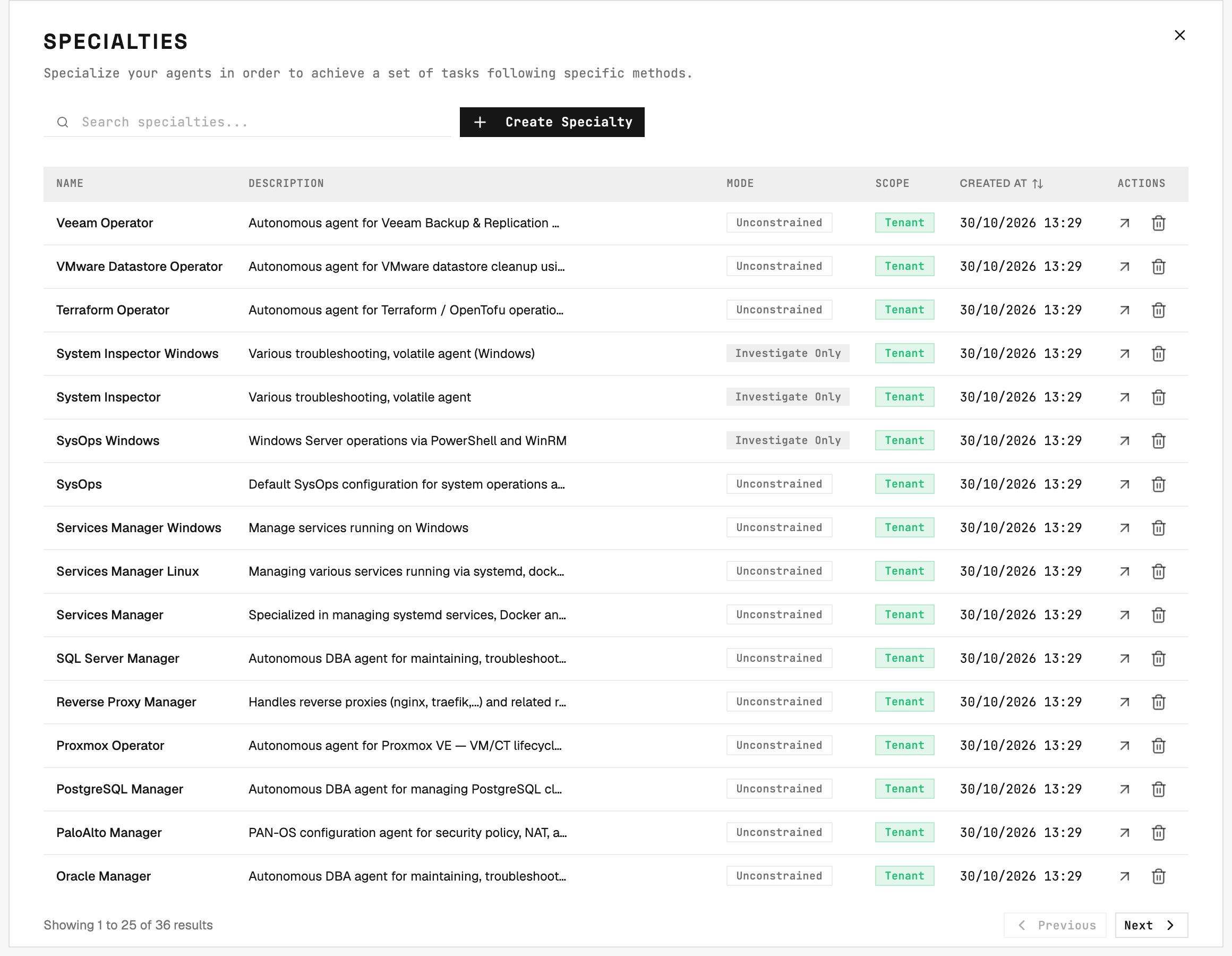
Specialties list: each row pairs a display name with a key the CLI and CSV importer use, and shows its mode and scope.
Separation of Concerns
To maximize accuracy, use different tools for different purposes:- Specialties: Define workflows, provide context, establish best practices
- Operational Rules: Enforce specific tool usage or behavioral requirements
- Blacklist: Prevent execution of prohibited commands
Managing Specialties
Go to Command Center → Specialties and click Create Specialty to add a new one.Name
The display name for your specialty. Use naming conventions that reflect the service domain or agent role. Example:TERRAFORM_SPECIALIST
Key
A read-only identifier automatically generated from the name. Use this key in CLI commands to assign specialties during agent initialization.Description
Context about the specialty’s purpose and scope. Agents read the full description - not just the name - when deciding how to plan and assign tasks, so a clear description improves routing accuracy for specialties where the name alone is ambiguous. Example:Handles Terraform infrastructure files for sandbox environments
Scope
A specialty is scoped to either a single organization or the whole tenant. By default it is Scoped to Organization, so only that org’s agents can use it. Pick Scoped to Tenant in the Scope selector to make it available to all organizations. Selecting the tenant scope requires tenant-level access; without it the selector stays on Scoped to Organization.MCP servers
MCP servers on the specialty’s page lists the plugins the specialty hands to every agent of it, including agents created later, one switch each, and searches for another one it can take: an organization’s specialty takes that organization’s plugins and the tenant-wide ones, and a tenant-wide specialty only tenant-wide ones. Each change saves on its own. See Plugins for how an inherited plugin and an agent’s own assignment combine.Investigate-Only Mode
A specialty can be set to investigate-only, making its agents read-only by default. A winning@2501:remediate ticket tag overrides this constraint for that job. Untagged jobs still honor the specialty setting, and a later @2501:investigate forces investigation for new tasks. The tag affects all new tasks in that job. A running task keeps its original mode.
This is useful for safely deploying large fleets of agents (e.g., 1000 Oracle DB agents) where you want read-only analysis by default. You can then selectively enable remediation for specific groups by changing this single setting on the specialty.
When investigate-only specialties kept an untagged job from remediating, the job resolution is flagged as partial rather than a failure. See Agents: Investigate vs Remediate for the full priority chain.