

Credential API
2501 reads passwords and keys from the PAM system: the Central Credential Provider (CCP) of CyberArk, or the API of WALLIX Bastion.
Session proxy
2501 opens SSH sessions on hosts through the PAM system: PSM for SSH of CyberArk, or the SSH proxy of WALLIX Bastion. 2501 never gets the password or the key of the host.
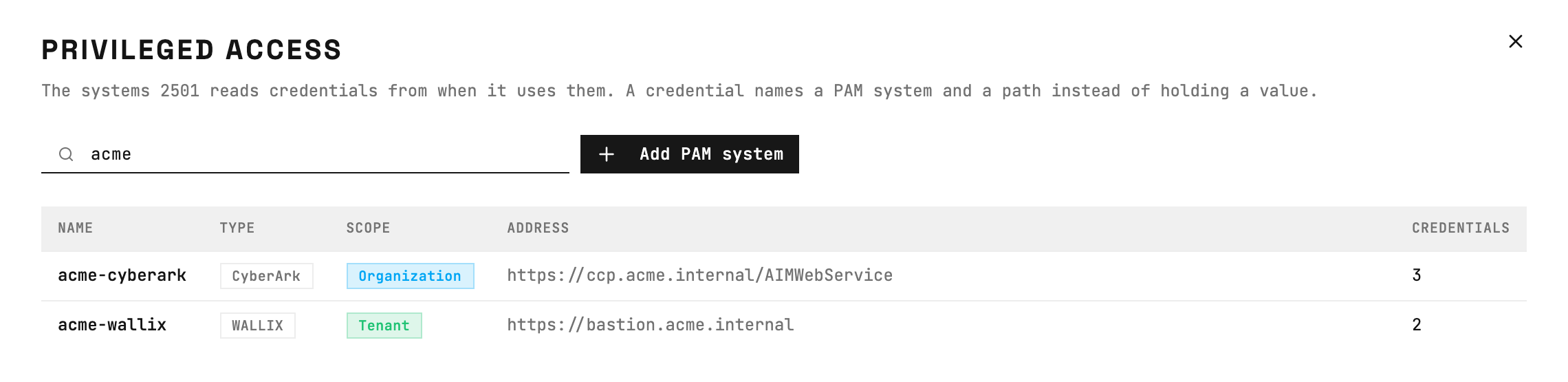
Privileged access: each row is a PAM system with its type and address.
Before you start
- You must be an administrator. Other roles do not see Privileged access.
- For the credential API:
- The engine must reach the PAM system over HTTPS. When you set an outbound proxy, the engine goes through it. To reach the PAM system directly, add its host to
proxy.noProxy. - For CyberArk, you need an application ID that signs in to the CCP with a client certificate. The application and the Provider user of the CCP must be members of the safes that 2501 reads. They need the Retrieve accounts and List accounts permissions.
- For WALLIX, you need an API user and its API key. The API user must have password retrieval on the accounts that 2501 checks out.
- The engine must reach the PAM system over HTTPS. When you set an outbound proxy, the engine goes through it. To reach the PAM system directly, add its host to
- For the session proxy:
- The engine and the executors must connect to the session proxy over SSH, directly or through the jump hosts of the host. On Kubernetes, make sure that the network policies of their pods allow this connection.
- For CyberArk, you need a vault user. It must be a member of the safes of the target accounts, with the Use accounts and List accounts permissions. It does not need Retrieve accounts, because it never gets the password.
- For CyberArk, the platform of the target accounts must allow PSM for SSH connections. If PSM for SSH asks for multi-factor authentication, make sure that it does not ask the vault user.
- For WALLIX, you need a Bastion user with authorizations on the target accounts. Each authorization must let the user run remote SSH commands.
Add a PAM system
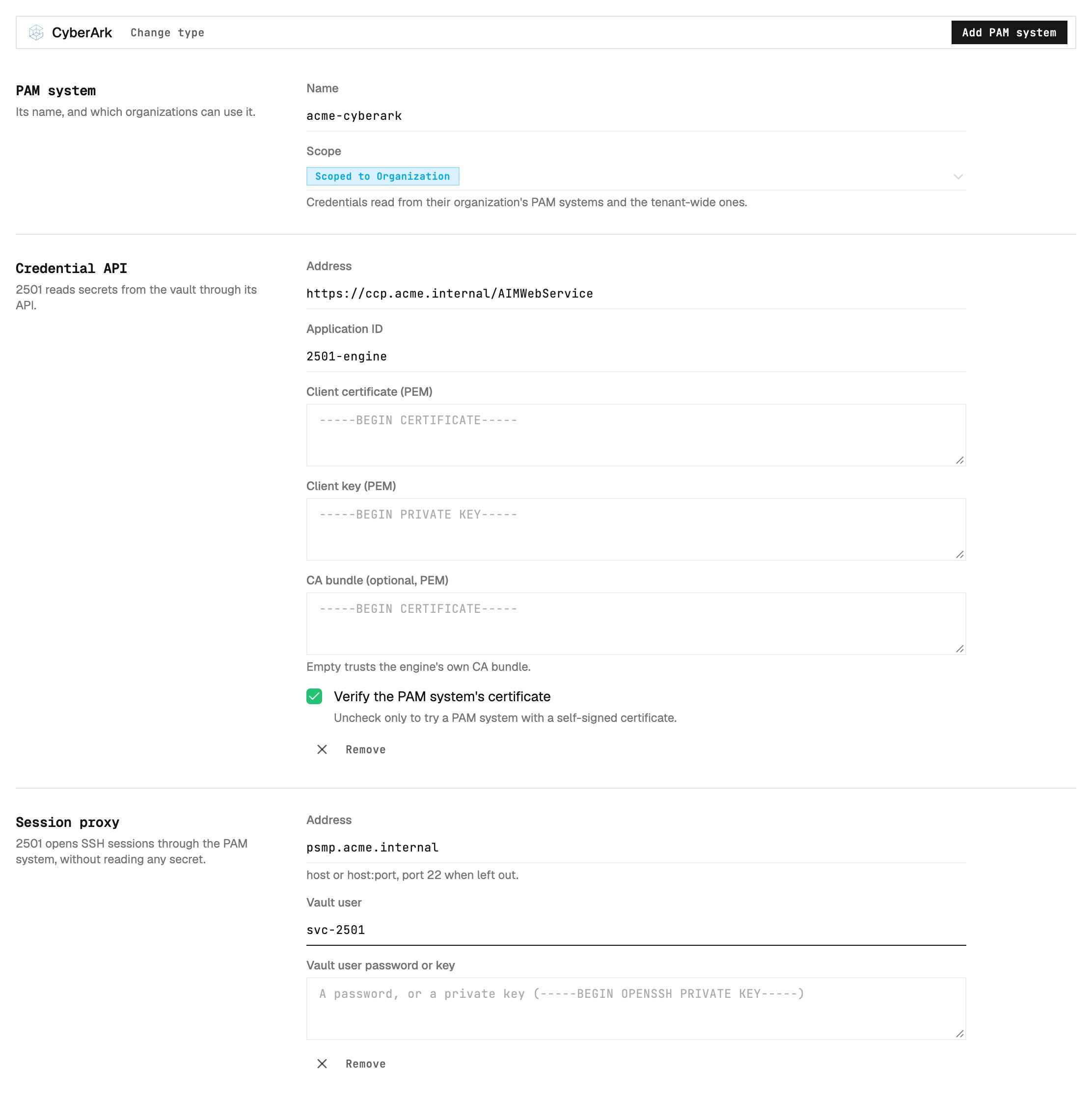
New PAM system: a credential API, a session proxy, or both.
1
Open the form
In Command Center, click Privileged access, then click Add PAM system.
2
Select the type
Click CyberArk or WALLIX Bastion.
3
Enter the name and the scope
Enter a name that identifies the PAM system, for example
acme-cyberark. Then select the scope. The scope table shows who can use the PAM system.4
Add the credential API
To read credentials, click Set up in Credential API. Enter the Address, for example
https://ccp.acme.internal/AIMWebService, and the sign-in fields.5
Add the session proxy
To connect to hosts through the PAM system, click Set up in Session proxy. Enter the Address, for example
psmp.acme.internal, and the sign-in fields.6
Save
Click Add PAM system. You must add one part or two parts.
7
Test the sign-in
On the page of the PAM system, click Run test in Sign-in test. The engine signs in to each part as a task does.
Create a PAM account credential
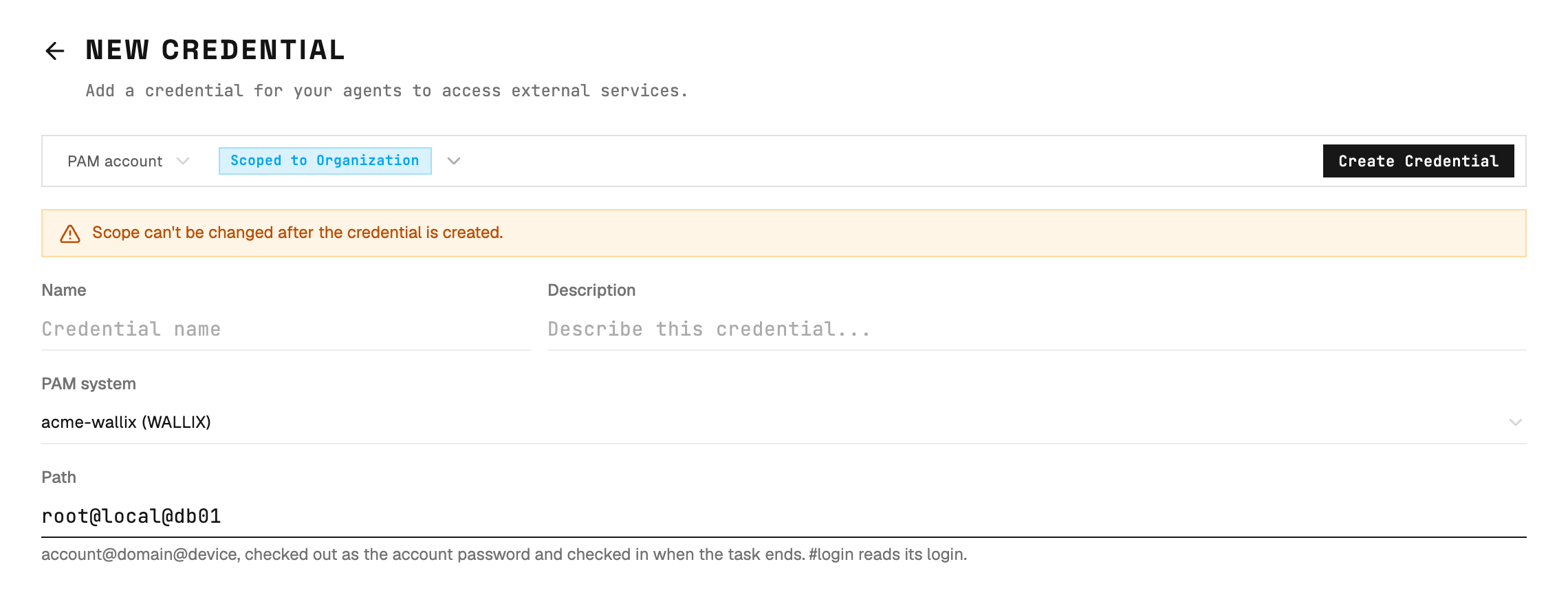
New credential of the PAM account type: a PAM system and a path.
1
Open the form
Click Credentials, then click Create Credential.
2
Select the type
Enter the name and the scope of the credential. Then select PAM account as the type.
3
Select the PAM system
Select the PAM system that keeps the account. The list shows only the PAM systems that the scope of the credential can use.
4
Enter the path
Enter the path of the account in the PAM system. The path format section gives the format for each type. 2501 does not accept a path with a different format.
5
Save
Click Create Credential.
Connect to a host through a session proxy
2501 connects to the session proxy, not to the host. The agent keeps only the account name.
Host page: 2501 connects to the host through the session proxy of a PAM system.
1
Open the host
Click Hosts, then click an SSH host. Create the host first if necessary.
2
Select the PAM system
In Reach through, select the PAM system, for example
acme-cyberark (CyberArk session proxy). Then click Save Changes.3
Give the account to the agent
Open the agent of the host. Assign one credential with the SSH Username role. Its value is the agent account in the format of the PAM system.
4
Test the connection
Click Test connection on the agent.
Reference
Credential API fields
2501 keeps the sign-in values on the PAM system, not in a credential. The client certificate, the client key, the API key and the CA bundle are write-only. When you edit a PAM system, leave one of these fields empty to keep its saved value.Session proxy fields
The password or key is write-only. When you edit a PAM system, leave it empty to keep its saved value.Agent account
The agent username is the account as your SSH clients give it to the PAM system. 2501 adds its own user.
For CyberArk, the target address is the Address property of the account in the vault. It can be different from the address of the host in 2501, for example a host name instead of an IP address.
Path format
For CyberArk,
Object is the name of the account in the vault, not its user name. For example: Linux-Prod/Operating System-UnixSSH-db01-root.
Scope
The tenant scope requires tenant-level access.
Session proxy limits
- Only SSH hosts that are not jump hosts can use a session proxy. The jump hosts of the host can lead to the proxy.
- Set it on the page of the host. The create form, the public API and import files do not set it.
Changes and deletion
- You cannot change the type or the scope of a PAM system. To change them, add a new PAM system.
- You can change the name, the addresses, the CA bundle and the sign-in values. Save the changes before you test.
- You can add a part to a saved PAM system. You cannot remove a saved part.
- You cannot delete a PAM system while credentials or hosts use it. The Used by panel shows these credentials and hosts.