

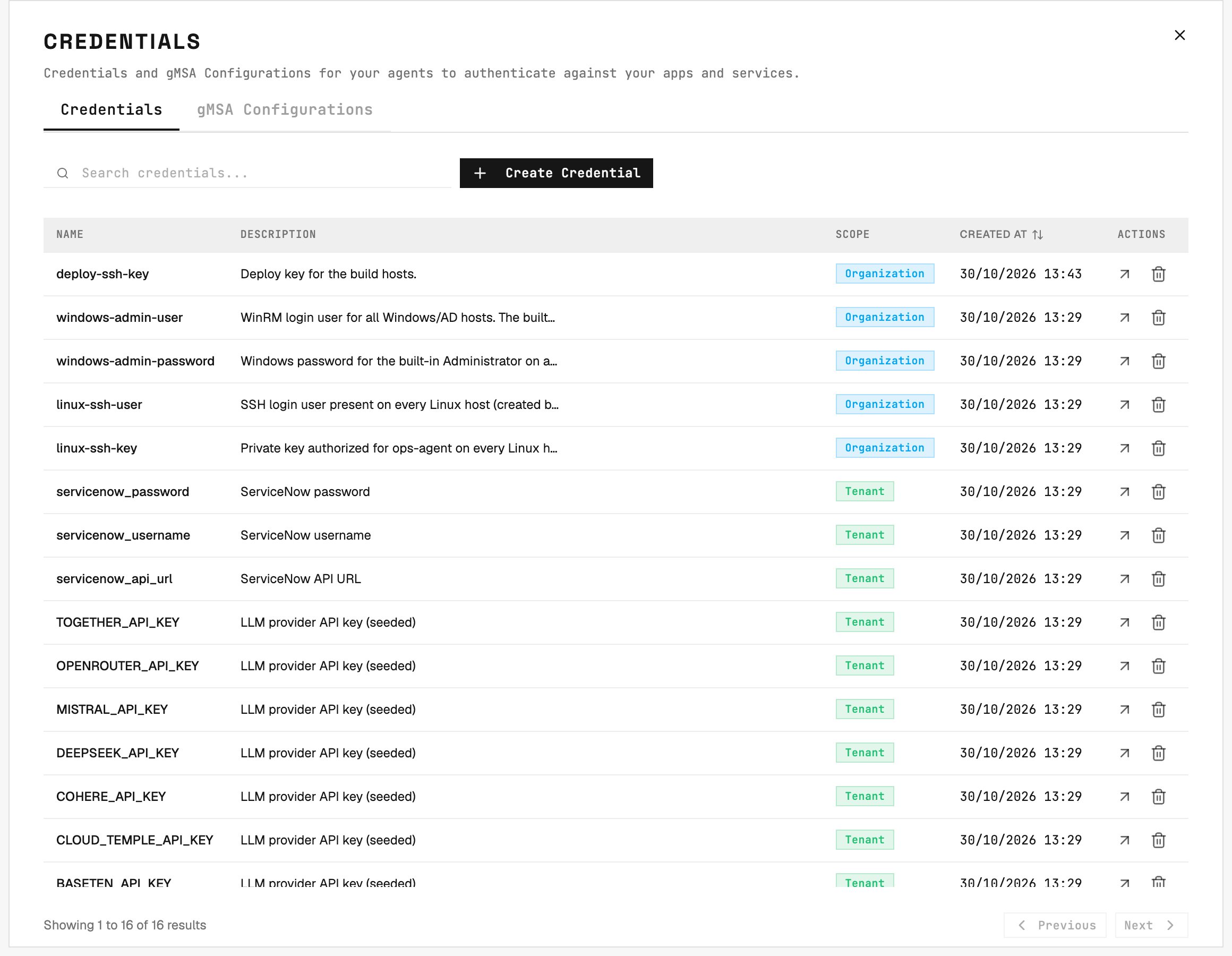
Credentials page: secrets and variables each have their own tab, and each row is a named credential with a scope (tenant or organization). The Secrets tab shows each secret's type, never its value; the Variables tab shows each value.
Managing Credentials
Go to Command Center → Credentials, open the Secrets or Variables tab, and click Create secret or Create variable.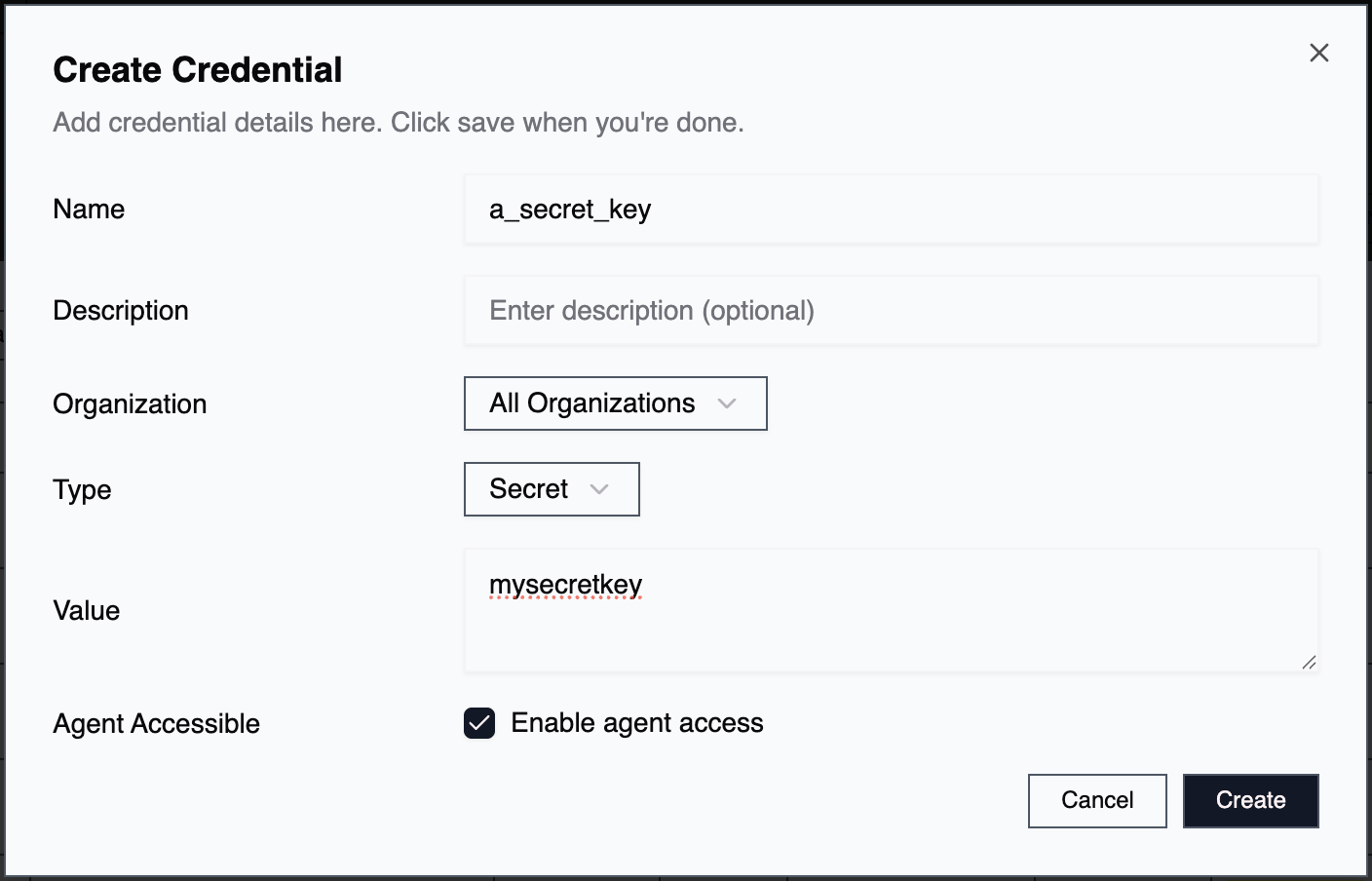
Name
A descriptive identifier for the credential. Use naming conventions that show its purpose and target system. Example:prod_db_ssh_root or aws_prod_api_key
Description
Additional context about what this credential is for. Example:Root SSH credentials for production Ubuntu database server
Scope
By default, credentials are scoped to the current organization, so only that org’s agents can use them. Pick Scoped to Tenant in the Scope selector to make a credential available to all organizations. Selecting the tenant scope requires tenant-level access; without it the selector stays on Scoped to Organization. A credential’s scope is fixed when it is created. The detail page shows it read-only; to change it, delete the credential and create it again.Type
The Variables tab creates a variable. The Secrets tab creates a secret, and you pick its type: Secret, SSH private key or PAM account.- Variable: Store a value that is not secret, such as a username, in clear. It is shown on the Variables tab, on its page and in the fields that use it.
- Secret: Store the value in 2501’s encrypted storage. It is never shown again.
- SSH private key: A secret that 2501 checks is an SSH private key when you save it.
- PAM account: Read the value from CyberArk, WALLIX or HashiCorp Vault. Requires the
enablePrivilegedAccessfeature toggle. See Privileged access.
VAULT_ADDR and VAULT_TOKEN. The engine reads these settings once, at its first start that has them and where Vault accepts the token, for each tenant that existed at the upgrade: it adds that Vault as a tenant-wide PAM system named Vault (Vault-2 if the name is taken) and makes each Vault path a PAM account of it. It carries over VAULT_NAMESPACE, VAULT_PREFIX and VAULT_SKIP_VERIFY if you set them. A path without #key to a secret with several keys and an empty or no value key gets #key for the key earlier versions read. A path with #key now reads that key, which earlier versions ignored; the engine logs each one whose secret has no such key. Until its path or account changes, the public API still shows a moved Vault path as you wrote it, and sending that same path back changes nothing. It reads a new path as you write it, without VAULT_PREFIX: give the full path, with #key for a secret with several keys and no value key. Until that start, 2501 keeps a Vault path but cannot read it. Then manage the Vault and its token on Privileged access, which needs the enablePrivilegedAccess feature toggle, off by default: turn it on to replace a token that expires. Without that Vault, the API refuses a Vault path: create a PAM account credential instead.
Value
The actual credential data. A variable’s value is stored as you enter it, without the spaces or line breaks around it. A secret’s value is encrypted and only decrypted when needed. For a PAM account, you select its PAM system and enter its path. ⚠️ Important: Escape special characters properly to prevent authentication errors.Agent Accessible
Controls whether agents can use this credential during tasks. Enable for:- SSH configurations for remote execution
- API keys for CLI tools
- Database credentials for queries
- Any credential the agent needs to pass to commands
- Service credentials used only by 2501 infrastructure
- MCP server authentication tokens
- Backend service bearer tokens
Assigning Credentials to Agents
Open an agent and select its credentials directly in Host authentication.
For a Host that uses a PAM session proxy, the form shows Session proxy instead of the authentication picker. See Privileged access.
Save the changes, then choose Test connection to check access to the Host.

Select the Host login credentials directly on the agent page.
Target Account and Permissions
2501 does not require a root user to operate on the target machine. Ensure the account used to connect has only the minimum permissions required for the agent’s tasks, regardless of the authentication method. Assign that account’s credentials when creating or editing the agent. When the host uses a PAM session proxy, assign only an SSH Username. The PAM system keeps the password or key of the account.Credential Roles
Roles define how agents use credentials during execution. They cover remote access over SSH:- SSH Username: Remote system login name
- SSH Password: Password-based SSH authentication
- SSH Private Key: Private key for key-based authentication
- SSH Public Key: Public key (rarely needed)
Common Use Cases
For SSH with a private key, select the login name under SSH user credential. Choose Private key under SSH authentication and select the key credential. For SSH with a password, select the login name under SSH user credential. Choose Password under SSH authentication and select the password credential.Deleting a Credential
A credential that something still uses cannot be deleted: the error names what is using it, so you know what to detach first. That covers agents, jump hosts, gMSA configurations, satellite clusters, plugins, the LLM providers that read their API key from it, and the Centrals that log in to their image registry with it or bind it by id in the version they run. A gateway whose connection uses the credential blocks the delete too, and the error names it by type and organization. To rotate a credential in use, change its value in place.Windows Authentication with gMSA
Windows (WinRM) hosts can authenticate using a gMSA (group Managed Service Account) over Kerberos instead of a static Windows username and password. This avoids storing a long-lived Windows admin password. Manage these under Command Center → Credentials → gMSA Configurations. Administrators can create, edit, and delete configurations. Before adding a gMSA configuration, create a credential holding the password of the Active Directory service account that 2501 binds as. The configuration references that credential and captures the AD connection details:- The gMSA account (its
sAMAccountName, ending in$) and the AD realm - The Domain Controller host and LDAPS port (default
636) - The LDAP search base and the bind DN of the service account
- Optional KDC endpoints, and for domain controllers that use a private certificate authority, a PEM CA certificate for the LDAPS connection