

SYSOPS.
Purpose of Specialties
While 2501 agents are built for autonomous system operations, specialization improves execution accuracy and reliability. Instead of operating generically, specialized agents follow domain-specific guidelines tailored to your infrastructure. Example: An agent with an AWS CLI specialty can manage EC2 instances with specific guidance on CLI usage patterns, error handling, and decision-making logic (like determining appropriate CPU upgrades when asked to “upgrade my sandbox machine”). Specialties work well for:- Providing context for proprietary or lesser-known tools
- Establishing workflows without full MCP integrations
- Documenting internal conventions and procedures
Separation of Concerns
To maximize accuracy, use different tools for different purposes:- Specialties: Define workflows, provide context, establish best practices
- Operational Rules: Enforce specific tool usage or behavioral requirements
- Blacklist: Prevent execution of prohibited commands
Managing Specialties
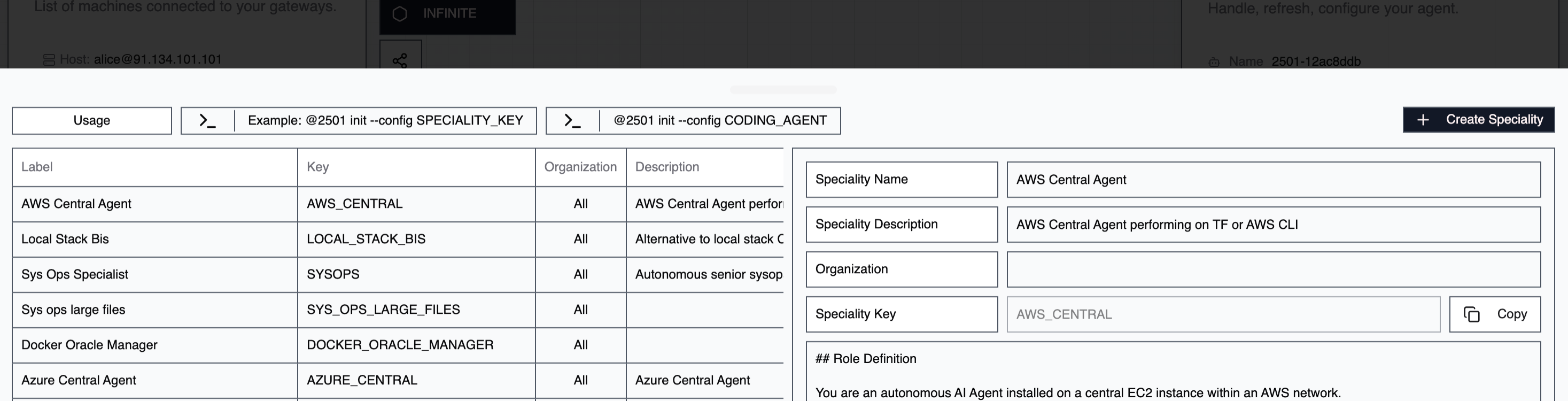
Go to Command Center → Specialties and click Create Specialty to add a new one.Name
The display name for your specialty. Use naming conventions that reflect the service domain or agent role. Example:TERRAFORM_SPECIALIST
Key
A read-only identifier automatically generated from the name. Use this key in CLI commands to assign specialties during agent initialization.Description
Optional context about the specialty’s purpose and scope. Example:Handles Terraform infrastructure files for sandbox environments